以下記錄在 Uipath StudioX 執行時發生「Runtime Execution Error」時的處理步驟。
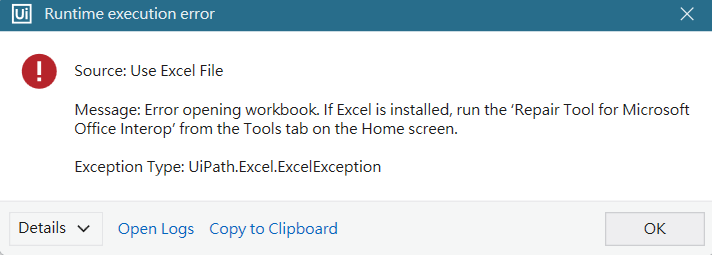
這次在使用Uipath StudioX發生了Runtime Error,詳細的訊息如下:
Something went wrong with .
Activity Use Excel File (Excel Application Card) failed:
Error opening workbook. If Excel is installed, run the ‘Repair Tool for Microsoft Office Interop’ from the Tools tab on the Home screen.
Unable to cast COM object of type 'System.__ComObject' to interface type 'Microsoft.Office.Interop.Excel.Application'. This operation failed because the QueryInterface call on the COM component for the interface with IID '{000208D5-0000-0000-C000-000000000046}' failed due to the following error: 介面未登錄 (0x80040155).
You can find the activity by searching id (press Ctrl + J to jump to activity):
01006
實際的畫面如下

排除步驟如下
步驟一:點選左上方的「HOME」

步驟二:「Tools」→ 「Apps」→ 「Repair Tool for Microsoft Office」

步驟三:在以下視窗點選「Excel」→「Generate Repair Plan」

步驟四:點選「Run Repair Actions」執行
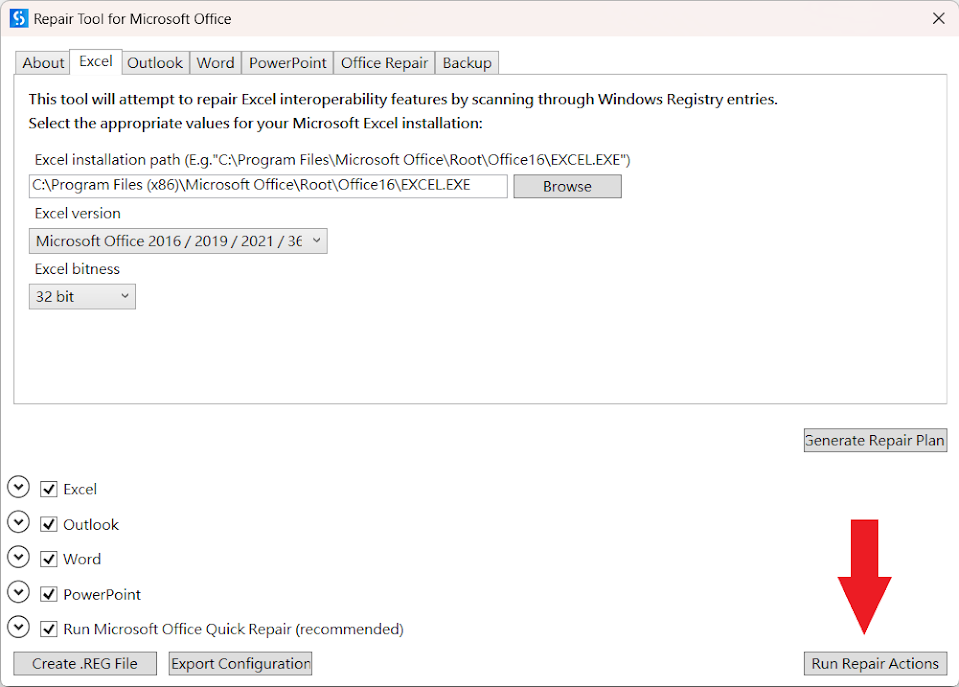
步驟五:等待執行完畢即可。

延伸閱讀

請先 登入 以發表留言。